
Fountain 1.5 - Revamped Trending Feed


Trending Feed
Fountain has always had a feed that surfaces recent activity from people you follow, but it started to feel a bit one-dimensional.
The new Trending feed changes that.
You’ll now see popular notes that include references to podcasts and music, either from people you follow, or from anybody on Nostr.
Ranking is determined by a combination of signals: how many sats were sent, how much engagement a note received, and how recently it was published. The result is a feed that feels more curated, more dynamic, more relevant, and more worth exploring - especially if you’re not following many (interesting) people yet.
We believe that when people recommend podcasts or music by putting money behind them - and when those recommendations are ranked by zaps rather than likes or upvotes - the quality of those recommendations is significantly higher.
Fountain’s Trending feed is our clearest expression of this idea so far: a discovery experience designed to reward signal over noise, and one that keeps you scrolling without dark patterns.
We’ve also made a number of improvements to the overall feed experience:
-
Faster loading: Feeds now load almost instantly.
-
Offline mode: A new cache layer lets you browse without a connection.
-
Improved note rendering: Reposts are now visible, and notes with multiple images display more cleanly.
-
One-tap zaps: Tap the zap button to instantly send your default amount, or press and hold to customise it or add a message.
We would love your feedback on how you’re finding the new Trending feed so we can keep improving it over time.
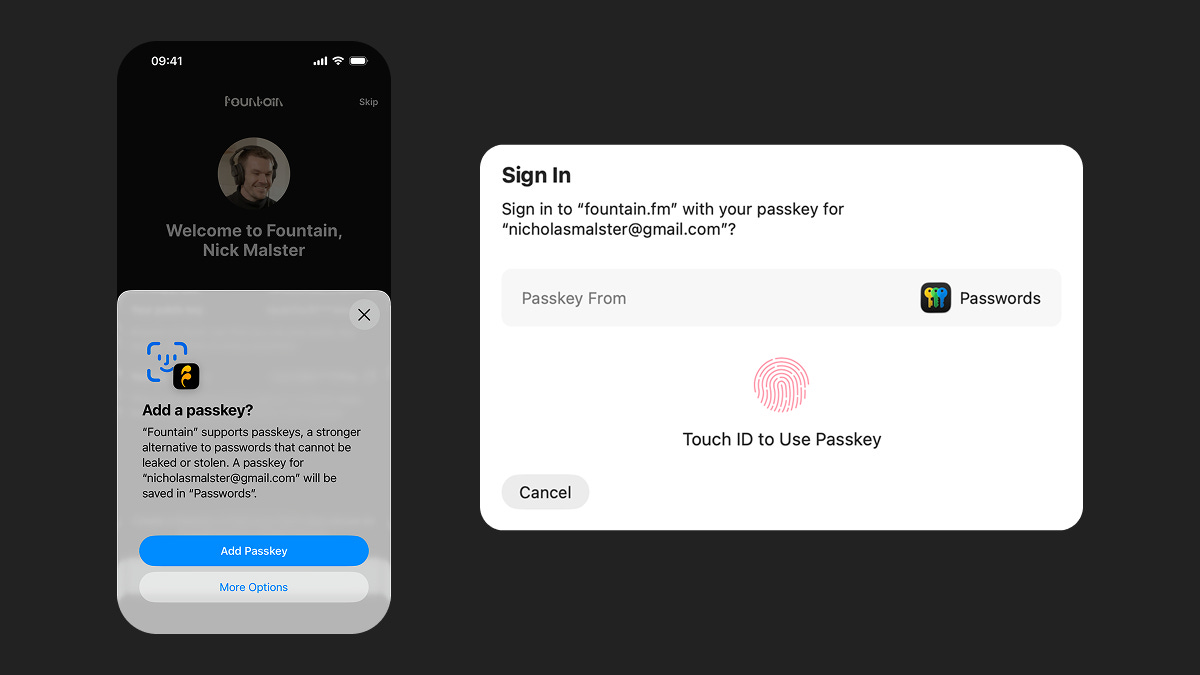
Passkey Login
Fountain now supports Passkeys to help you keep your Nostr keys secure across all your devices.
Passkeys let you connect to Nostr without handling a private key. Just use your device with Touch ID, Face ID, or a PIN, and your key stays securely on your device.
How it works:
-
Sign up or log in with email on the Fountain mobile app
-
Create a Nostr profile or import an existing one
-
Create a Passkey when prompted
-
Log in with email at fountain.fm and use your Passkey to connect Nostr
Previously, connecting Nostr on web required a browser extension like Alby. You still have the option to connect Nostr via a browser extension, but Passkeys make it much simpler - especially if you’re new to Nostr.
We would love to hear how you’re finding Fountain. Please submit your thoughts and feedback via the main menu in the app and we will take it on board as we continue to improve the app.
If you want to help test new features out before they get released, you can join Fountain Beta on Telegram. All iOS and Android users welcome.
Looking for comments…
Searching Nostr relays. This may take a moment the first time this article is opened.
Looking for comments…
Searching Nostr relays. This may take a moment the first time this article is opened.