
App Stores on GrapheneOS

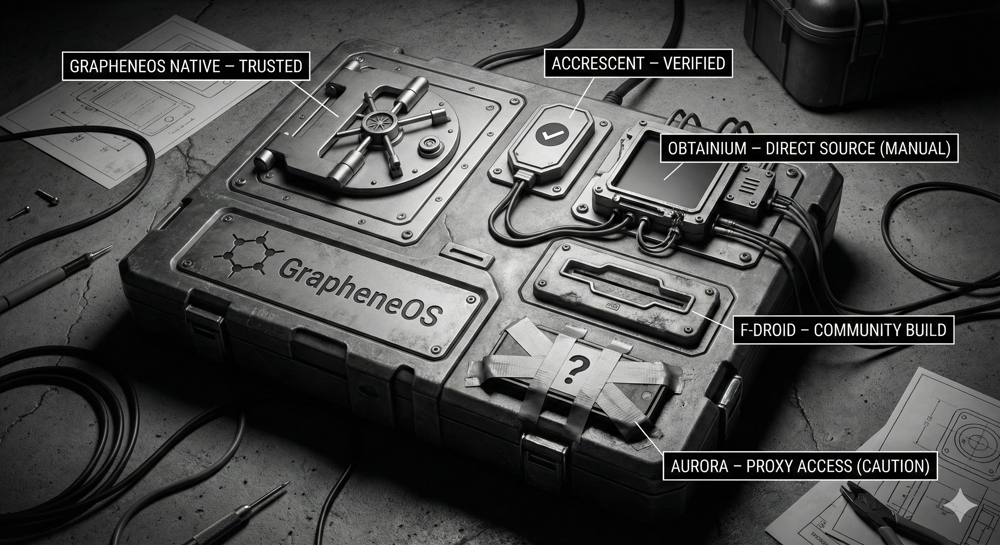
The Chain of Trust — Source verification is the foundation of digital sovereignty.
von Alien Investor
#GrapheneOS #Android #AppSecurity #FDroid #Obtainium #Privacy #Sovereignty #OPSEC
────────────────
„Whether this results in actual security depends entirely on your decisions. If you want control, you must accept responsibility.“
────────────────
A False Sense of Security
Just because an app works, doesn’t mean it was installed cleanly. Many users on GrapheneOS focus exclusively on permissions. This is important — but incomplete.
The source of an app is just as critical as the sensors it can access.
The source determines who built it.
The signature determines who is allowed to deliver updates.
The update chain determines whether manipulation would be detected.
Signatures and checksums are not just for developers. They are the basis of any serious security model.
────────────────
How Trust Is Established
GrapheneOS follows a simple but strict principle: The app signature is the developer’s identity.
Every app is signed with a cryptographic key. Every update must carry exactly the same signature. If the signature changes, the update is rejected.
If this chain is broken, there are only two possibilities: The developer lost the key, or someone else is suddenly injecting code. Both are critical failures.
This logic is the foundation of why some App Stores on GrapheneOS make sense — and others do not.
────────────────
The Hierarchy of Trust
GrapheneOS App Store — The Standard
The GrapheneOS App Store is the first and most important stop. It is pre-installed on the device simply as “App Store”.
Why? Integrated close to the system. Minimal feature set. Verified builds. No trackers, no accounts.
Everything available in the GrapheneOS App Store is the secure standard.
Accrescent — Small but Auditable
Accrescent is unknown to many, but operates in a league of its own regarding security. Install it directly from the GrapheneOS App Store.
Features: Focus on reproducible builds. Strict signature verification. No middlemen.
Accrescent offers very few apps, but that is the point. No bloat. Just verifiable code.
Obtainium — The Power Tool
Obtainium is powerful — and therefore dangerous if you don’t understand the threat model. Install it via the official GitHub repository, not a store.
It pulls apps directly from the developer (GitHub, GitLab, Release Feeds), bypassing store intermediaries.
Obtainium is a scalpel, not a kitchen knife. If you use it, you take responsibility for the source.
F-Droid — Use with Caution
F-Droid is often perceived as “safe” by default. This is an oversimplification.
While it offers Open Source transparency, it often relies on third-party rebuilds with different signatures than the original developer. Updates are frequently delayed.
Use F-Droid only if there is no better source or for non-critical tools. For high-security applications, it is not the first choice.
────────────────
The Aurora Problem
Aurora Store is convenient. That is its weakness.
It allows you to install Play Store apps anonymously. However, it circumvents the strict signature and update trust model of the original Play ecosystem. The cryptographic chain of trust becomes less transparent.
Convenience is not a security concept. If you value clean provenance and verifiable updates, avoid Aurora.
────────────────
Isolation: Profiles as a Superpower
GrapheneOS allows for true separation at the OS level.
User Profiles: Physical separation of apps and data. No access between profiles. Ideal for separating “Banking” from “Social Media”.
Work Profiles (Shelter): Shelter creates a logical container within a user profile. It isolates apps (like Google Play Services) while still allowing notifications. Not perfect, but massively superior to unfiltered integration.
────────────────
The Decision Logic
A simple mental checklist for your setup:
- Is it in the GrapheneOS App Store? → Use it.
- Is it in Accrescent? → Use it.
- Official Source + Obtainium? → Use if you understand it.
- Only F-Droid? → Weigh the risks.
- Aurora required? → Look for alternatives.
────────────────
The Experimental Frontier: Zap Store
A new model is emerging from the Nostr community: The Zap Store.
Unlike central authorities (Google/Apple), the Zap Store relies on cryptographic keys (Nostr) and reputation. Developers publish apps themselves; trust is established via signatures, not a corporate review board.
It is young and experimental, but it serves as an excellent radar for freedom-tech.
The Zap Store relies on user responsibility. It is built for the informed, not the passive.
────────────────
Conclusion
GrapheneOS does not force security upon you. It provides the tools.
Whether this results in actual security depends entirely on your decisions. If you want control, you must accept responsibility.
────────────────
Further Reading
👉 Install Guide — GrapheneOS: Reclaiming Ownership: https://primal.net/Alien-Investor/grapheneos-reclaiming-ownership-of-your-device 👉 Deep Dive — GrapheneOS Hardening: https://primal.net/Alien-Investor/grapheneos-hardened-android-for-the-surveillance-age 👉 Tool Guide — Obtainium: The Master Key: https://primal.net/Alien-Investor/obtainium-the-master-key-for-your-android 👉 Isolation — Shelter on Android: https://primal.net/Alien-Investor/shielding-your-mobile-os-shelter-on-android-and-grapheneos 👉 Nostr — Zap Store vs. Monopoly: https://primal.net/Alien-Investor/nostr-zap-store-attacking-the-app-store-monopoly
Sources: 👉 Obtainium (GitHub): https://github.com/ImranR98/Obtainium 👉 Shelter (F-Droid): https://f-droid.org/de/packages/net.typeblog.shelter/ 👉 Zap Store: https://zapstore.dev/
────────────────
🧰 Tools for True Owners (Affiliates — Support at No Extra Cost)
Tools I use myself — for Bitcoin self-custody and digital sovereignty:
📕 Alien Investor Guides: My own eBook “GrapheneOS: Android in the Surveillance Age” — the complete step-by-step guide to hardening your phone against the surveillance state. 👉 https://alien-investor.org/buecher
🔧 Alien Phone Service — GrapheneOS professionally installed and configured, delivered to your door. No flashing required. Bitcoin or Fiat. 👉 https://alien-investor.org/en/grapheneos-flash-service.html
💥 21bitcoin: Bitcoin-only app from Europe, ideal for DCA and stacking sats regularly — no shitcoins. Use code ALIENINVESTOR for a permanent 0.2 percentage point fee reduction on instant and savings plan purchases. 👉 https://alien-investor.org/21bitcoin
₿ BitBox: Hardware wallet for secure self-custody. I use the BitBox — available as the classic BitBox02 and the new BitBox for iPhone (Nova). Use code ALIENINVESTOR for 5% off. 👉 https://alien-investor.org/bitbox
🛡️ Proton: Swiss all-round protection for email, VPN, and cloud — privacy-first, no Big Tech dependency. 👉 https://alien-investor.org/proton
Disclaimer: Some of these links are affiliate links. If you use them, you support my work at no extra cost to you. Thank you!
────────────────
Money, power, Bitcoin — and OPSEC. I write about financial sovereignty, privacy, and cybersecurity in a world built on control. More at alien-investor.org 👽
Looking for comments…
Searching Nostr relays. This may take a moment the first time this article is opened.
Looking for comments…
Searching Nostr relays. This may take a moment the first time this article is opened.